01
Accessing Notifications:
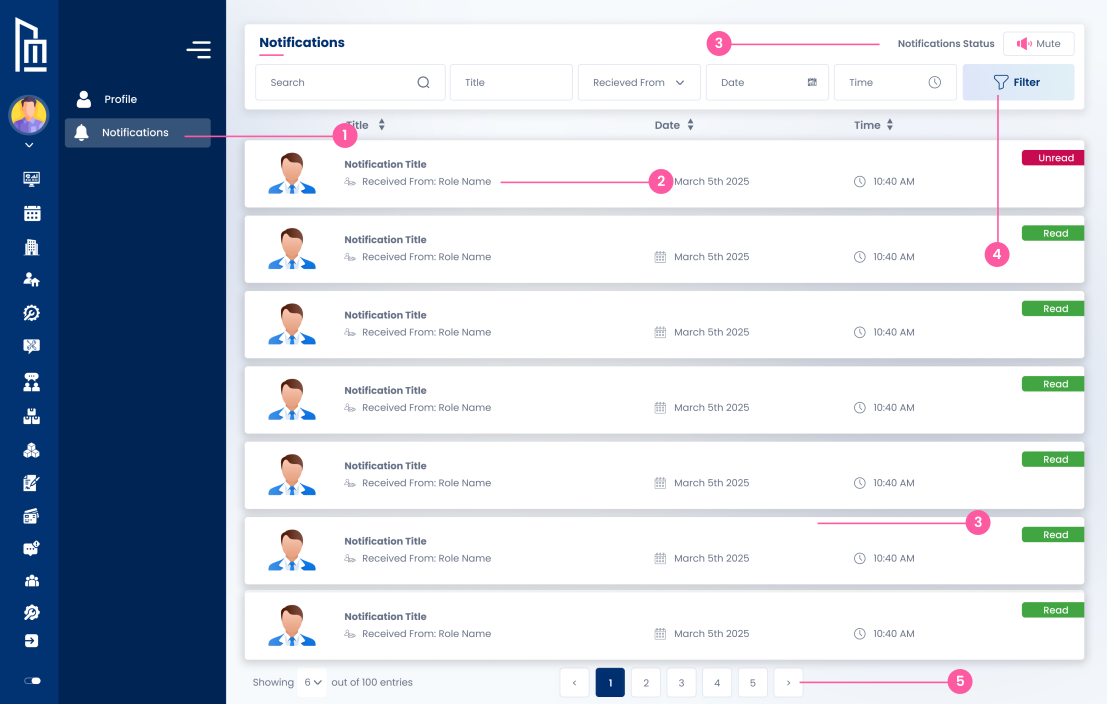
The user clicks the "Notifications" link in the sidebar to view their message log.
Follow the steps below to complete this action inside Marafiqy.
The user clicks the "Notifications" link in the sidebar to view their message log.
They see a list of notifications, each showing a Notification Title, who it was Received From (labeled as "Role Name"), the Date (e.g., "March 5th 2025"), and the Status (e.g., "Unread" in a red badge or "Read" in a green badge).
They see and can perform the action of clicking the "Mute" toggle under "Notifications Status" to temporarily silence or disable incoming alerts.
They can perform the action of using the Search bar to find messages by Title and applying a Filter to quickly sort or narrow the list.
They see that the list is paginated, with the ability to navigate between pages (e.g., 1, 2, 3, 4, 5) to view all 100 total entries.